Using Payment Links, Payment Page, payment extensions, Payouts, POS, or the Reconciliation API? View the classic product documentation
Settlement and billing
How Peach Payments settles funds and bills for transactions.
View transaction status and reporting
The Peach Payments Dashboard provides a transaction listing for monitoring and reporting.
Info
To understand why payments are sometimes unsuccessful, see the Response codes section.
When signing up with Peach Payments, you confirmed two email addresses that Peach Payments sends the below emails to. Contact support to add or change any of these.
- Technical assistance
- Technical notifications for system status - sign up for notifications on status.peachpayments.com
- Reconciliation emails
- Invoice emails
For any finance-related queries, such as settlement, invoices, billing, and so on, contact finance@peachpayments.com.
Reconciliation
To learn more about reconciliation reports and the Reconciliation API, see the Reconciliation section.
Settlement
Settlement is the payment of funds into your business bank account for the money collected from customers when they buy from your online business. You should receive net settlement (the balance of the total incoming amounts (for example, debits) less outgoing amounts (for example, refunds)) from your bank or Peach Payments regularly, with the cadence varying per bank.
If you signed a merchant account agreement directly with a bank, for example, Absa, Nedbank, or FNB, you are using an ISO merchant account with that bank. If you didn't sign an agreement directly with a bank, you are probably using a Peach Payments merchant account.
Warning
Peach Payments might withhold settlement for various reasons, including outstanding FICA documents, suspected fraud, chargeback disputes, sudden spikes in transaction volumes, incomplete verifications, outstanding fees, and so on. These measures are in place to ensure a secure, trustworthy environment for all parties involved in the payment process.
Independent Sales Organisation (ISO) merchant account
You should receive net settlement from Nedbank every day. What you make online today should reflect in your bank account in the usual bank clearing periods (typically one business day).
For example, Peach Payments settles all sales from today less any refunds or reversals paid today, tomorrow. Settlement for 31 January happens on 1 February.
Your bank statement should include a Nedlink DP <merchant number> line item, for example, Nedlink DP 2552555.
Peach Payments aggregation merchant account
For Peach Payments aggregation merchant accounts, you receive free net settlement for every payment method every day, excluding weekends and public holidays:
| Customer makes payment | Peach Payments settles |
|---|---|
| Monday, Tuesday, Wednesday, Thursday | Next business day |
| Friday, Saturday, Sunday | Monday |
| Public holiday | Next business day |
Peach Payments makes a single deposit for all your payment methods less any refunds or reversals into your bank account on one day, and you should see it reflect in your bank account the next day, depending on bank clearing periods.
Peach Payments sends an email with each settlement processed which includes a link to the settlement reconciliation report to your reconciliation contact on the Dashboard. The email contains the total amount Peach Payments is settling, and a settlement summary that includes the transaction period, the deposit reference, and a payment method breakdown. You can configure a custom settlement deposit reference to control what appears on your bank statement.
Info
To change the reconciliation contact, create a support ticket.
You can also download settlement reconciliation from the Dashboard.
Settlement reconciliation
The Reporting > Settlements section enables you to download settlement reconciliation to help you identify which payments Peach settled in which settlement batch.
Settlement reconciliation covers all payment methods and contains important information, including transaction date, time, unique ID, merchant transaction ID, payment method, amount, and more.
All merchants have access to the Settlements section of the Dashboard, but it's empty for ISO merchants who do not have aggregation transactions that Peach Payments settles.
Download a report
Info
Only certain roles can download settlement reconciliation.
Download a report as follows:
- Log in to the Peach Payments Dashboard.
- In the Reporting section, click Settlements.
- Find the report that you want to download and click Download on the right.
Info
If the status of the settlement reconciliation is:
Processing: Peach Payments is checking the transactions before settling them. Peach Payments could withhold settlement for some transactions at this stage, although it's unlikely.Settled: Peach Payments has settled the batch of transactions and you should receive your settlement in 24 hours if you provided the correct bank details and the bank account is open.

Billing
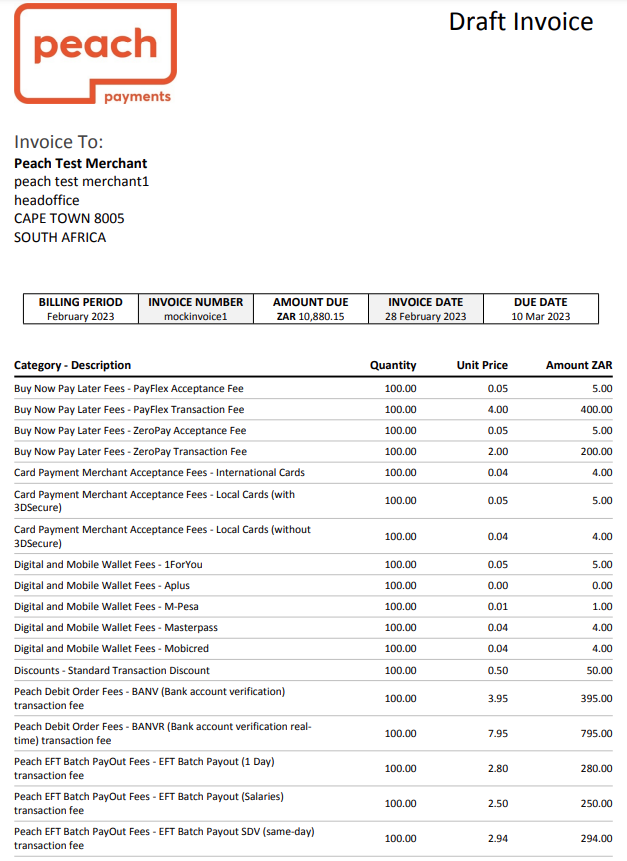
Peach Payments sends you an invoice for the previous month in the first four business days of each month. The invoice contains a list of transaction types and corresponding fees.
Info
Payment is due by the 10th of each month.
In addition to the transaction types, the invoice uses the following terminology:
| Term | Description |
|---|---|
ACK | Transaction acknowledged as complete by the payment method. |
NOK | Transaction not acknowledged as complete by the payment method. |
SDV | Same Day Value EFTs reflect in the recipients bank account on the same day. |
When reading your invoice, keep the following in mind:
- The invoice includes fees in the following categories:
- Monthly fees, such as the payment method provisioning and tokenisation fees, don't generally change from month to month.
- Acceptance fees are a percentage of the value of the transactions.
- Transaction fees depend on the number of transactions. Certain payment providers charge transaction fees over and above the Peach Payments transaction fee. For example, for Payflex transactions, there are two transaction fee line items, one for the Payflex transaction fee (R4.00 in this example) and one for the Peach Payments transaction fee (R1.50 in this example).
- For card payments, Peach Payments charges transaction fees for both
ACKandNOKtransactions, while for other payment methods, Peach Payments only charges forACKtransactions. - Your invoice only includes line items for payment methods and services that you use.
- If you do not pay your Peach Payments invoice by debit order, your invoice email and the invoice itself include links that you can use to pay the invoice.
Info
- Quantity is either volume or value based. If the unit price on your invoice is a percentage, for example, 0.0295, the corresponding quantity is a monetary value. Otherwise, the quantity is volume based. The amount always equals the quantity multiplied by the unit price.
- Apple Pay transactions are always processed without 3-D Secure.
- Your invoice might call certain payment methods a different name, for example, on your invoice:
- Masterpass is Scan to Pay.
- 1ForYou is 1Voucher.
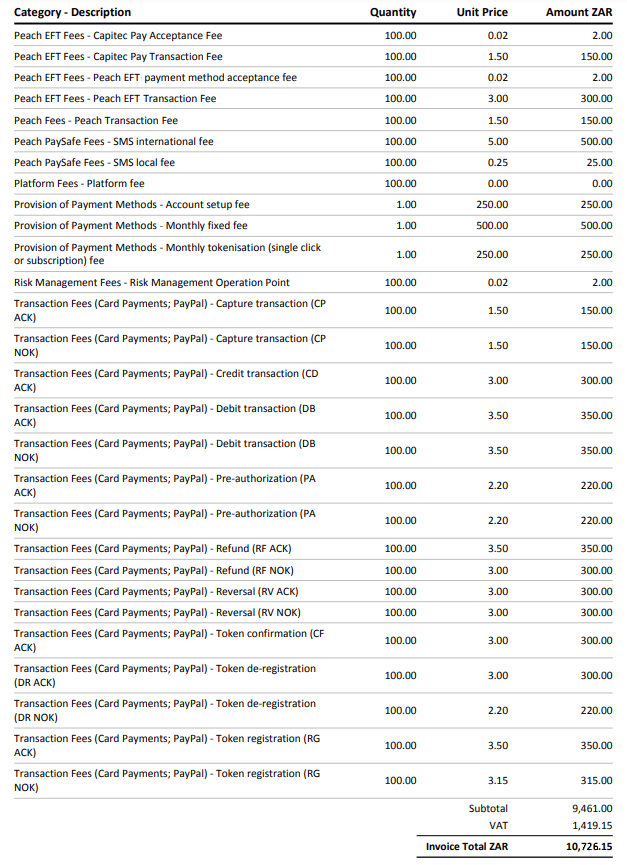
The following sample invoice, with fake transactions and fees, shows what line items you can expect on your invoice:
You can use the itemised billing report to verify your invoice:
- Log in to the Peach Payments Dashboard.
- In the left navigation menu, click Billing.
- Download the report for the billing period that you're interested in.
The billing report downloads and you can use it to verify your invoice.
FAQ
When I log in to the Peach Payments Dashboard, why can't I see any transactions
Show answer
After you've logged in to the Peach Payments Dashboard, the Dashboard displays the current day's transactions. To view more transactions, ensure that you filter for the date range that you want to view.